
Scan QR Codes Without Guesswork. Know What Is Safe, Instantly
QRsafer verifies every scan across multiple threat engines, flags risky links fast, and cuts false alarms so you can scan with confidence in real life.
Detection Engine
Cross-check before you tap
Live Intelligence
Real-time threat map + scan feed
Global QRsafer Network Snapshot
Live dataReal usage and threat metrics from the active scan network.
Total Scans
…
Scans (24h)
…
Scam Reports
…
Countries Active
…
High-Risk Detections
…
Why QRsafer
Protection That Actually Works
Skip single-source scanners. QRsafer combines multiple threat signals to deliver fast, reliable QR phishing detection with fewer false alarms.
Catch What Others Miss
Multiple threat engines validate each QR code so dangerous links are flagged before you open them.
No More False Alarms
Cross-verification cuts noisy warnings, so alerts are meaningful and safe results stay fast.
Always Up-to-Date Protection
New QR scams show up daily. QRsafer updates continuously to catch emerging threats in near real time.
Works Where You Need It
From parking meters to menus, protection follows your camera so you can scan safely anywhere.
Your Privacy Matters
Built for protection first, with privacy-conscious defaults and no unnecessary tracking.
Know Exactly What's Wrong
Every risky result explains the threat type so you can decide quickly and avoid repeat scams.
Fewer Misses. Fewer False Alerts.
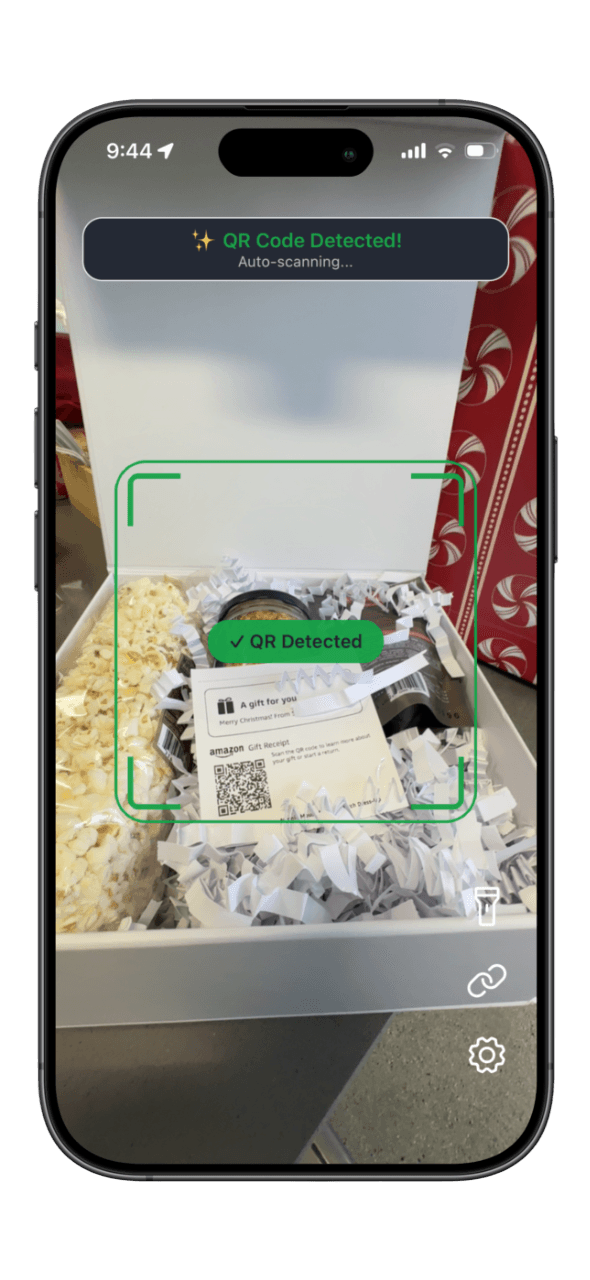
QRsafer checks links against multiple threat intelligence sources in one pass. You get clearer results fast, with less noise and better protection against quishing attacks.
Multi-Engine Detection
Independent engines verify each result before you open the link.
Cleaner Alerts
Fewer low-quality warnings, so high-risk alerts are easier to trust.
See Threat Activity As It Happens
Track live scan activity, risky detections, and regional volume trends on the threat map. Understand what is happening now, not hours later.
Explore Threat Map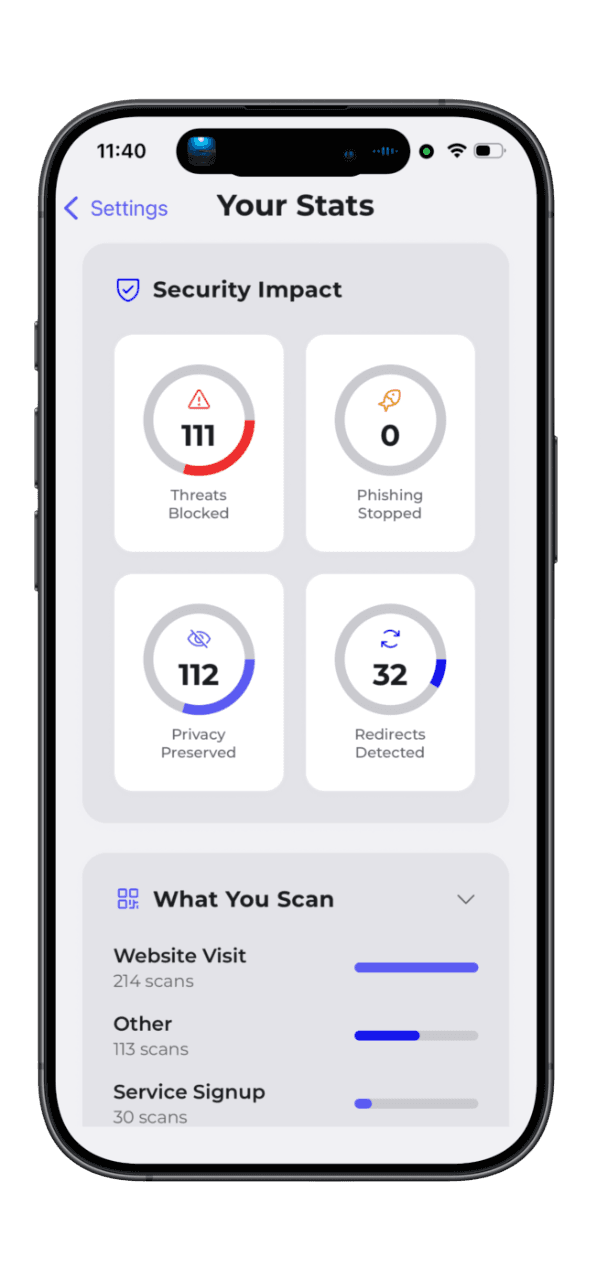
Scan with Confidence
Experience instant QR code security analysis with multi-source threat detection. Get real-time protection against phishing, malware, and scams—all while keeping your data private.
Levels of Protection
Start with free QR phishing detection, then upgrade for deeper multi-engine protection and advanced threat intelligence.
Free
Get started with reliable protection
Essential threat scanning
Google Web Risk protection
Last 20 scan history
30-second ad delays
Standard scan mode
Premium Individual
Maximum protection with zero false alarms
Multi-source threat detection
Cross-verification for accuracy
Unlimited scan history
Instant results (no ads)
Advanced scan mode with detailed analysis
Priority notifications
Single user account
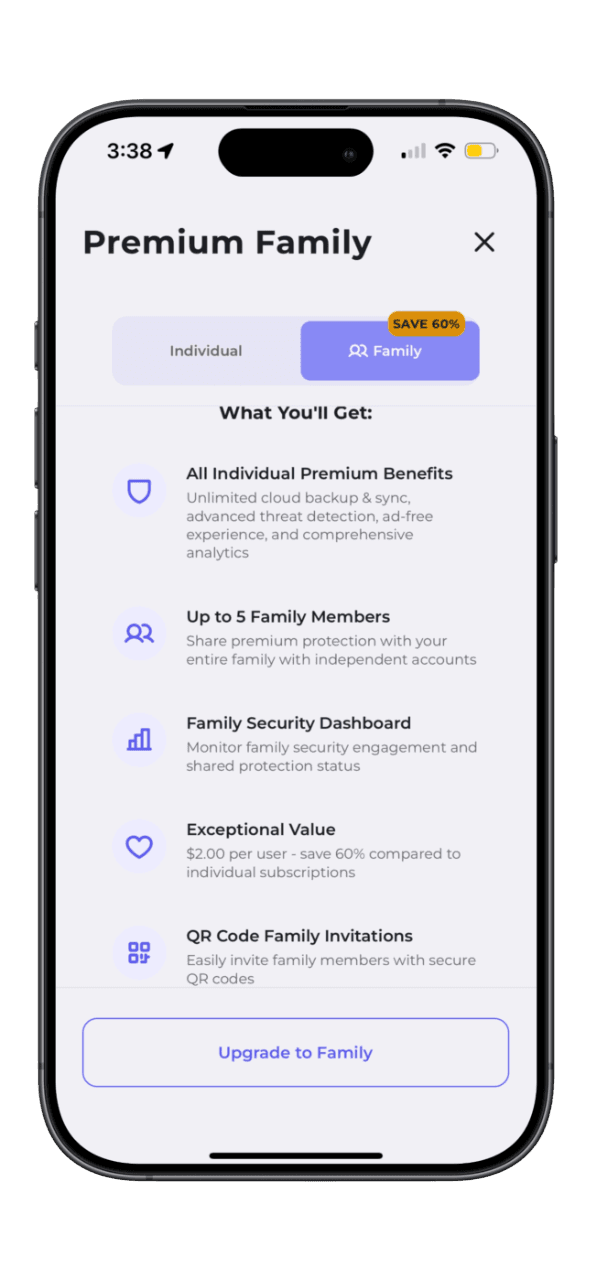
Premium Family
All Premium features + family sharing
All Premium Individual features
Family sharing (up to 5 accounts)
Shared threat intelligence
Frequently Asked Questions
Find answers to common questions about QRsafer's security features, pricing plans, technical support, and more. Browse by category or search for specific topics.
QRsafer is a mobile security app that protects you from malicious QR codes. Before you open any QR code, QRsafer scans it through multiple security databases and advanced detection systems to identify phishing websites, malware, scams, and hidden threats. Think of QRsafer as your personal security guard for QR codes - checking every code before you interact with it, so you never accidentally visit a dangerous website or fall victim to a scam.
When you scan a QR code with QRsafer, the app performs multiple security checks in seconds: (1) Extracts the content to see what it contains, (2) Checks security databases by querying multiple threat intelligence sources, (3) Analyzes patterns for common scam indicators like cryptocurrency addresses or phishing attempts, (4) Follows redirects to reveal the final destination if the URL redirects multiple times, (5) Detects hidden threats using advanced analysis to find malware hidden in the QR code itself, and (6) Shows you the verdict with a clear SAFE, WARNING, or DANGER result. All of this happens in seconds, protecting you before you ever open the link.
QR codes are everywhere - restaurant menus, parking meters, posters, product packaging, and payment systems. But here's the problem: you can't see where a QR code leads just by looking at it. Scammers exploit this by creating malicious QR codes that look identical to legitimate ones. These fake codes can steal your passwords and bank account information, charge your credit card or phone bill, install spyware on your device, trick you into sending money to criminals, or harvest your personal data. Your phone's built-in camera can read QR codes, but it can't tell if they're dangerous. That's where QRsafer comes in - we analyze every code for threats before you open it.
No! QRsafer works without any login, email, password, or personal information. The app creates an anonymous session automatically when you first launch it, your device gets a unique ID stored locally only, and scan history is tied to your device. Premium purchases are managed through your Apple ID or Google account. This means instant access with better privacy, no password to remember, and no email spam. However, scan history is device-specific and does not sync across devices, and Premium subscriptions require 'Restore Purchases' on new devices.
Best practices: (1) Always use QRsafer - Never scan with built-in camera alone as it can't detect threats, QRsafer checks BEFORE you open anything. (2) Verify the source - Do you trust where this QR code came from? Official business or random sticker? Permanent sign or temporary printout? (3) Check for tampering - Is this a sticker placed over original code? Does QR code look professionally printed? Are edges peeling or showing another code underneath? (4) Be suspicious in public - Parking meters, ATMs, restaurants are common targets where scammers place fake codes over real ones, verify with staff before scanning payment codes. (5) Never enter passwords - Legitimate companies don't ask for passwords via QR codes, verify URL matches official domain, use browser to navigate to site manually instead. (6) Watch for urgency - 'Expires in 5 minutes!' is a pressure tactic, legitimate offers don't rush you, take time to verify. (7) Verify domains - Check URL closely for misspellings like paypa1.com vs paypal.com. (8) Don't send money - Never send cryptocurrency to QR code addresses, verify payment requests through official channels.
QRsafer uses a multi-layered security system: Layer 1 - Security Databases (Free tier: 1 database, Premium tier: 5 databases containing millions of known malicious websites updated continuously). Layer 2 - Pattern Detection analyzes for cryptocurrency scams, fake tech support, payment app phishing, premium rate phone numbers, suspicious WiFi credentials, and social engineering tactics. Layer 3 - Redirect Chain Analysis follows every redirect (up to 10 hops), reveals the final destination, identifies suspicious patterns, and detects security downgrade attacks. Layer 4 - Steganography Detection uses entropy analysis to detect encoded malware payloads, obfuscated exploit code, and hidden executable content. All checks run in parallel for speed, delivering results in seconds.
Steganography is the practice of hiding malicious code inside innocent-looking data. For QR codes, attackers can embed malware directly into the QR code's data that looks normal to the eye but contains hidden threats. QRsafer uses Shannon entropy analysis - a mathematical way to measure randomness in data. Normal text has entropy of 3.0-5.0, while encrypted/encoded malware has entropy of 7.0-8.0. When QRsafer detects suspicious patterns, it calculates entropy. High entropy (>7.5) plus scam pattern equals DANGER - indicating encoded malware. This catches advanced threats that traditional scanners miss because they only check URLs against databases.
QRsafer detects cryptocurrency scams through pattern analysis including fake giveaways promising 'Free Bitcoin' or guaranteed returns, investment schemes with urgency tactics, wallet phishing designed to steal your crypto, and direct cryptocurrency addresses in QR codes. Example: A QR code on a flyer promises 'Scan for FREE $500 Bitcoin!' linking to a fake celebrity giveaway page that asks you to 'verify' your wallet by sending crypto first - resulting in permanent loss. QRsafer detects these through cryptocurrency address patterns combined with urgency language, known scam domains in databases, and recently registered domains with crypto keywords.
Tech support scams are fake Microsoft, Apple, or antivirus warnings that trick you into calling scammers who charge $300-500 for fake 'repairs.' The QR code claims your device is infected, shows fake virus warnings, displays a phone number for 'support,' and scammers demand payment while potentially installing remote access software. Example: QR code on a library computer says 'VIRUS DETECTED! Scan to fix' linking to a fake Microsoft domain showing a popup to call immediately, resulting in $400 charges for fake virus removal. QRsafer detects these through Microsoft/Apple keywords combined with phone numbers, misspelled official domains, and homograph detection using lookalike characters.
Payment app phishing involves fake login pages for Venmo, PayPal, Cash App, Zelle, or regional payment platforms designed to steal credentials and drain accounts. QR codes appear on fake parking meters or payment terminals, link to clones of legitimate login pages, capture your username/password, and transfer money out before you notice. Example: A parking meter QR code says 'Pay with Venmo' but links to venmoo.com (fake) instead of venmo.com, with an identical-looking login page that steals credentials and $500 from your account. Detection includes payment app keywords plus login forms, misspelled payment domains, and subdomain spoofing patterns.
Premium SMS scams use QR codes that open text messages to premium-rate numbers charging $10-20 per message or subscribing you to recurring fees. The QR code opens Messages with a pre-filled premium short code (4-6 digits), and sending the SMS triggers immediate charges plus potential daily subscription fees that appear on your phone bill weeks later. Example: Poster says 'Text to win free iPhone!' opening SMS to premium number 55877 with 'JOIN,' resulting in $15 charge plus $10/day subscription totaling $300+ in unwanted charges. QRsafer detects short code patterns, pre-filled message analysis, urgency language, and known premium rate number databases.
Malicious WiFi network QR codes connect you to attacker-controlled networks that intercept passwords, credit cards, and personal data through 'man-in-the-middle' attacks. QR codes appear in coffee shops, hotels, or public venues with WiFi credentials, connecting you to fake networks where attackers monitor all internet traffic and record passwords and credit cards. Example: Coffee shop table QR says 'Free WiFi - Scan to Connect' to fake 'Starbucks_Guest' network, allowing attackers to intercept Gmail login and compromise email account. Detection includes SSID mismatch with venue name, unusual authentication methods, and suspicious credential formats.
QRsafer prevents two types of phone scams: Premium Rate Calls where QR codes display phone numbers charging $20-50 per minute with scammers keeping you on hold to maximize charges, and Callback Scams where QR codes trigger missed calls from international numbers that charge $10-50 when you call back out of curiosity. Example: Lamppost QR says 'Found your lost dog! Call to claim' showing premium rate $3.99/min number, resulting in $40 charge for 10-minute call. Detection includes premium rate number patterns (900, 976 area codes), international premium rate detection, callback scam patterns, and impersonation attempts.
Social engineering uses psychological manipulation tactics creating urgency, fear, or excitement that bypasses rational judgment. Scammers use emotional triggers like urgency ('Expires in 5 minutes!'), fear ('Your account will be closed!'), authority ('IRS Final Notice'), greed ('You won $10,000!'), and curiosity ('See who viewed your profile'). Example: Mailbox QR says 'IRS TAX REFUND - Claim $2,847 before it expires' creating urgency, authority, and greed that makes you rush to scan without thinking, leading to phishing site stealing SSN. Detection includes urgency language patterns, authority impersonation, emotional manipulation keywords, and prize/lottery/refund scam patterns.
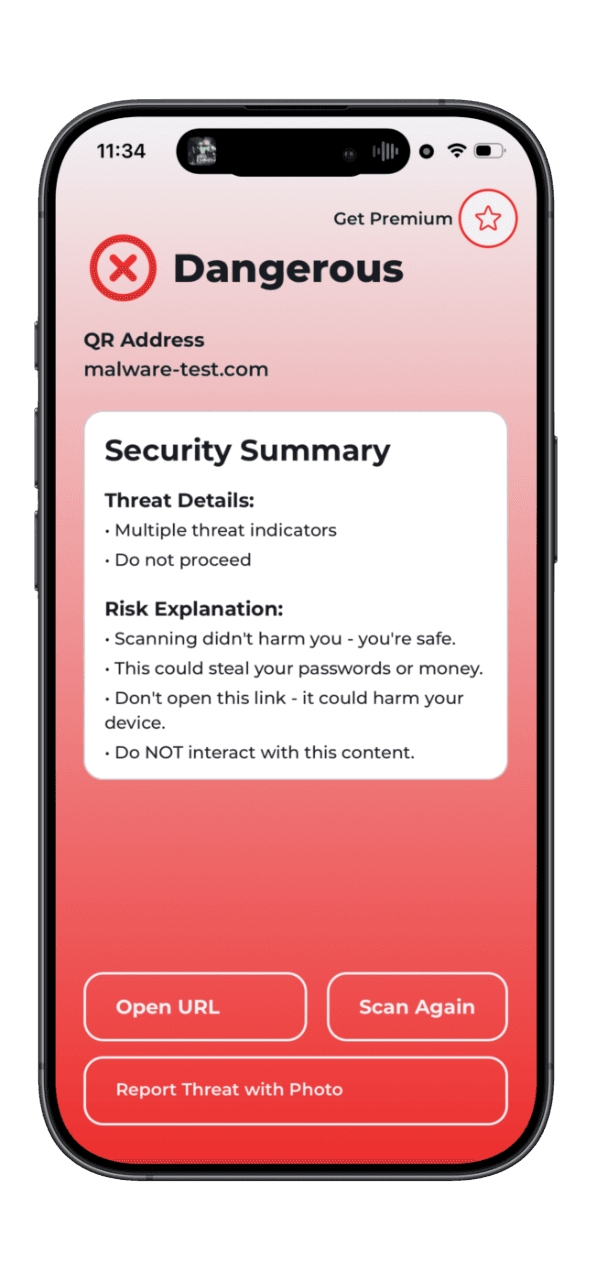
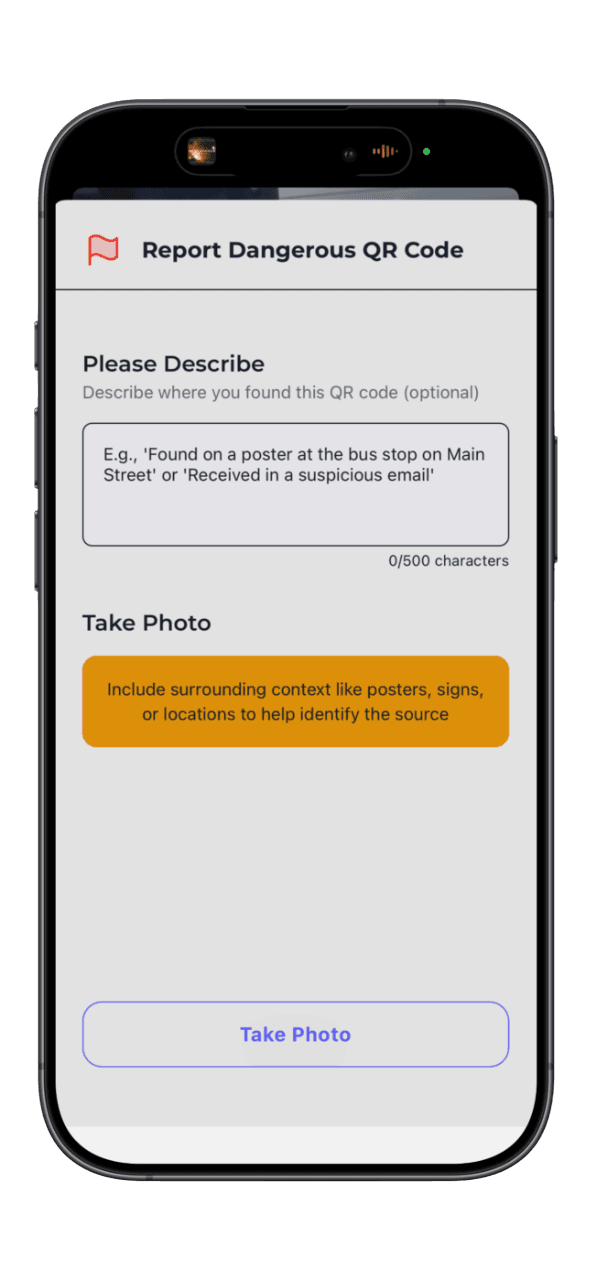
When QRsafer detects a dangerous QR code: (1) Access is blocked - the link won't open automatically, (2) Clear warning appears showing DANGER or WARNING status, (3) Threat details explained telling you specifically what's wrong, (4) Risk level shown indicating multiple databases flagged this threat, (5) Action guidance provides clear recommendation (DO NOT OPEN), and (6) Report option lets you help protect others by reporting the location. You always have control and can choose to proceed at your own risk (not recommended) or safely close the warning. For safe QR codes, QRsafer shows a green SAFE verdict and lets you open the link immediately.
Yes! QRsafer offers a free version with essential protection including single security database scanning, last 10 scans saved in history, basic threat detection, and ad-supported experience. For maximum protection, QRsafer Premium unlocks 5 security databases for comprehensive threat detection, unlimited scan history, Direct Open feature to skip tracking redirects for privacy, unlimited daily scans (Free: 20 scans per day), ad-free experience, and priority support. Premium Pricing: Individual $4.99/month or $49.99/year (save 17%), Family (up to 5 members) $9.99/month or $99.99/year (save 17%).
Premium unlocks QRsafer's complete protection suite: Enhanced Security with 5 security databases instead of 1 for comprehensive multi-source threat detection, priority API access for faster scan results, and advanced pattern detection. Privacy Features include Direct Open to skip tracking redirects and open final URLs directly, plus no ads for a cleaner, faster experience. Usage Benefits provide unlimited scans per day (Free: 20 scans/day limit), unlimited scan history (Free: last 10 scans), and priority support with faster response times. Family Sharing allows up to 5 family members on Family plan with each member getting full Premium features managed through the main account holder. Pricing: Individual $4.99/month or $49.99/year (save 17%), Family $9.99/month or $99.99/year (save 17%).
Direct Open is a Premium feature that lets you skip redirect chains and open the final destination URL directly. Many QR codes use URL shorteners and tracking links that go through multiple redirects (bit.ly → tracking.company.com → analytics.partner.com → final destination). Direct Open takes you straight to the final page, providing faster loading, more privacy by avoiding tracking pixels, and fewer cookies to reduce data collection. It's safe to use for marketing campaigns with tracking pixels, URL shorteners like bit.ly, and simple redirects with safe destinations. However, don't use it for login/authentication flows (OAuth), payment checkout processes, session-based QR codes (concert tickets, boarding passes), or suspicious redirect chains flagged by QRsafer. QRsafer analyzes the redirect chain and warns if Direct Open might break functionality or pose security risks.
To restore Premium: (1) Install QRsafer on new device, (2) Open app and navigate to Settings, (3) Tap 'Restore Purchases,' (4) Apple/Google verifies your subscription automatically, (5) Premium features activate immediately. Requirements: Same Apple ID or Google account used for original purchase, active subscription (not expired or cancelled), and internet connection. Troubleshooting: For 'No purchases found' verify you're signed in with correct account and check App Store/Play Store subscriptions to confirm it's active. For 'Subscription expired' check subscription status in iOS Settings → [Your Name] → Subscriptions and resubscribe if needed. If still having issues, contact support@qrsafer.com with your Apple/Google receipt.
When you click a link, you might not go directly to the destination. The link bounces through multiple intermediate servers: QR Code URL (bit.ly/abc123) → Redirect 1 (tracking.company.com) → Redirect 2 (analytics.partner.com) → Final Destination (example.com/page). Legitimate uses include link shortening (bit.ly, tinyurl), marketing analytics to track clicks, A/B testing to send different users to different pages, and click tracking to measure campaigns. Malicious uses include hiding destinations to make phishing links look legitimate, evading filters to bypass URL blocklists, stealing data where each redirect tracks device info, and injecting malware to compromise at any hop. QRsafer follows the entire chain showing how many redirects exist, each intermediate hop, final destination URL, risk level for each step, and suspicious patterns like mixed HTTP/HTTPS or excessive hops. Premium Direct Open lets you skip the chain entirely.
Data QRsafer collects - Required for functionality: Scanned URLs to check for threats, security scan results, anonymous device ID (generated locally), and Premium subscription status. Optional (with user consent): Geographic location for threat map intelligence, device model and OS version, anonymous usage analytics, and crash reports for debugging. QRsafer NEVER collects: email address or phone number, personal identifiers, contact lists or photos, browsing history outside QRsafer, or passwords and credentials. Data retention: Scan history stored until you delete or uninstall app, analytics kept for 90 days, URL cache expires after 30 days. User controls: Disable location services in Settings, opt out of analytics tracking, delete scan history anytime, and uninstalling removes all local data.
Yes! Your scan history is completely private. Storage: Stored on your device with local database, does NOT sync across devices, each device has its own separate history, and encrypted for security. Access: Only you can view your history on that specific device, QRsafer team cannot access individual histories, and anonymous IDs prevent identification. Controls: Clear individual scans or entire history anytime, uninstalling app deletes all data, and switching devices means starting fresh history. Why no sync? We prioritize privacy. Not syncing history means your scans never leave your device, no cloud storage of potentially sensitive URLs, and complete control over your data. Analytics: Aggregate statistics only (e.g., '1M scans blocked this month'), no individual URL tracking, and opt-out available in Settings.
Cached results (previously scanned URL) are instant (under 1 second). New scans (first time seeing URL) take a few seconds for most URLs, several seconds for URLs with redirects, and up to 10 seconds for complex redirect chains. Speed is affected by network connection quality, number of redirects to follow, whether URL is cached, and first scan after app launch (slight delay for initialization). Performance optimizations include security checks running in parallel, edge function warmup to reduce delays, 30-day caching for faster repeat scans, and instant results when cached.
QRsafer has limited offline protection using local pattern analysis. What works offline: URL structure analysis, scam pattern detection (cryptocurrency, tech support, social engineering), entropy analysis for steganography, and previously cached scan results. What requires internet: Security database checks (cannot verify against latest threats), redirect chain following (need to contact destination servers), and real-time threat intelligence updates. Recommendation: Use QRsafer offline for basic pattern protection, but connect to WiFi or cellular for comprehensive scanning when possible.
When you click a link, websites collect information about you including device type (iPhone, Android, etc.), location (city, country), time you clicked, how you found the link, IP address, and browser type. Tracking URLs contain special parameters like utm_source, utm_campaign, device, and location that tell the website something about you. Companies do this to measure ad campaign success, understand customer behavior, A/B test different marketing messages, and retarget you with ads later. Privacy concerns include building profile of your interests, tracking you across multiple websites, sharing data with advertisers, and potentially revealing sensitive information. QRsafer shows you when URLs contain tracking parameters and lets Premium users skip tracking chains with Direct Open.
Common causes and solutions: First scan after app launch takes 2-5 seconds longer than subsequent scans due to one-time initialization delay (Solution: Wait 30 seconds after opening app before first scan). Complex redirect chains where each redirect adds 0.5-2 seconds and some marketing URLs have 5+ redirects (Solution: Premium users can use Direct Open to skip redirects). Poor network connection where slow internet increases scan time, especially mobile data in low-signal areas (Solution: Connect to WiFi for faster scans). Uncached URLs where first-time URLs take several seconds but repeat scans are instant when cached (Solution: Rescan the same QR for instant results). API timeouts where rarely security databases don't respond with 15-second timeout before fallback (Solution: Scan again, usually resolves).
Occasionally, legitimate websites may receive warnings due to: New domain registration where recently registered domains are flagged as suspicious since scammers often use brand-new domains, though legitimate startups may trigger this (Verify domain ownership, check company website separately). Low reputation where small websites lack reputation data and are not necessarily dangerous, just unknown (Proceed with caution, verify legitimacy). Pattern similarity where URL structure resembles common scams, like 'win-prize' might flag legitimate sweepstakes (Check if you trust the source). Shared hosting where legitimate site shares server with malicious sites and entire server IP may be flagged (Verify domain name carefully). If you believe it's a false positive, email support@qrsafer.com with URL and explanation for investigation within 24-48 hours to help improve protection for everyone.
Solutions: (1) Check permissions - iOS: Settings → QRsafer → Camera → Allow, Android: Settings → Apps → QRsafer → Permissions → Camera. (2) Improve lighting by scanning in well-lit area, avoiding direct sunlight that creates glare, and turning on phone flashlight for dark environments. (3) Hold steady by keeping camera still for 1-2 seconds, positioning QR code in center of screen, and ensuring QR code is fully visible in frame. (4) Try Upload Image by taking photo of QR code with regular camera and using QRsafer's 'Upload Image' feature when camera scanning fails. (5) Restart app by force closing and reopening QRsafer to resolve most temporary camera issues.
Troubleshooting steps: (1) Verify Apple ID/Google account - Ensure you're signed in with same account used for purchase (iOS: Settings → [Your Name], Android: Settings → Google). (2) Check subscription status - iOS: Settings → [Your Name] → Subscriptions, Android: Play Store → Menu → Subscriptions, confirm QRsafer subscription is active. (3) Use Restore Purchases - Open QRsafer → Settings, tap 'Restore Purchases,' wait 10-20 seconds for verification. (4) Check internet connection - Restore requires internet to verify with Apple/Google, connect to WiFi if cellular is unstable. (5) Update app - Ensure latest version of QRsafer installed as old versions may have restore bugs. Still not working? Contact support@qrsafer.com with purchase receipt screenshot, device model and OS version, and Apple ID email (or Google account email).
Need help? Email: support@qrsafer.com, Website: https://qrsafer.com, Response times: Premium users within 24 hours, Free users within 48 hours, Security reports within 24 hours (urgent priority). For security reports: security@qrsafer.com. Privacy Policy: https://qrsafer.com/privacy, Terms of Service: https://qrsafer.com/terms.